




How to make comments odd and even, so that the comments look more separate from each other.
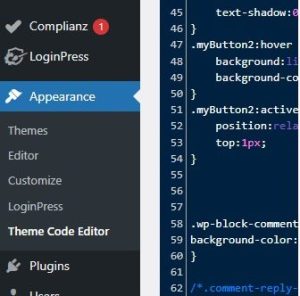
Select Appearance and then theme code editor. to get this page
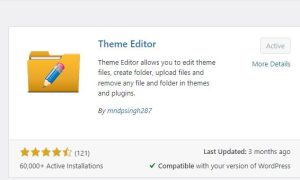
theme editor is for code editing, this is what you are going to need for this project.
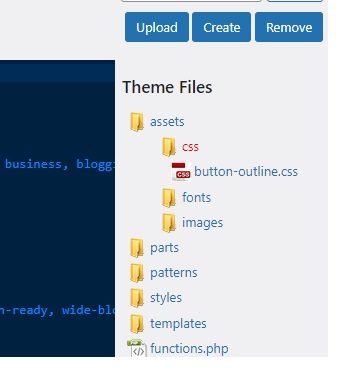
where to find the CSS file for editing.
update

.myButton {
box-shadow: 3px 4px 0px 0px #899599;
background:linear-gradient(to bottom, #ededed 5%, #bab1ba 100%);
background-color:#ededed;
border-radius:16px;
border:6px solid #d6bcd6;
display:inline-block;
cursor:pointer;
color:#3a8a9e;
font-family:Arial;
font-size:17px;
font-weight:bold;
padding:11px 40px;
text-decoration:none;
text-shadow:0px 1px 0px #e1e2ed;
}
.myButton:hover {
background:linear-gradient(to bottom, #bab1ba 5%, #ededed 100%);
background-color:#bab1ba;
}
.myButton:active {
position:relative;
top:1px;
}

.myButton2 {
box-shadow: 5px 4px 20px 7px #276873;
background:linear-gradient(to bottom, #599bb3 5%, #408c99 100%);
background-color:#599bb3;
border-radius:8px;
display:inline-block;
cursor:pointer;
color:#ffffff;
font-family:Arial;
font-size:20px;
font-weight:bold;
padding:13px 32px;
text-decoration:none;
text-shadow:0px 1px 0px #3d768a;
}
.myButton2:hover {
background:linear-gradient(to bottom, #408c99 5%, #599bb3 100%);
background-color:#408c99;
}
.myButton2:active {
position:relative;
top:1px;
}

.wp-block-comment-reply-link .even .comment {
background-color:#ccddf2;
}

/*.comment-reply-link{display:none}*/
.comment-reply-link{background-color:#ccddf2}

.wp-block-comment-template .odd{background-color:#ccddf2}
.wp-block-comment-template .even{background-color:#CCCCCC}
.wp-block-comment-author-name {
margin: 0 0 48px;
overflow: hidden;
position: relative;
background-color:#55737D;
color:#FFFFFF;
padding: 10px;
}
/*.wp-block-comment-date { margin: 0 0 48px; overflow: hidden; position: relative; background-color:#55737D; color:#FFFFFF; padding: 10px;}*/

/* comments section*/
.comment-reply-title{display:none}
.logged-in-as{display:none}

header {
position: sticky;
top: 0;
z-index: 999;
}
First code is to get the code working, before start editing to your liking.
.wp-block-button.is-style-outline
> .wp-block-button__link:not(.has-text-color, .has-background):hover {
background-color: var(–wp–preset–color–contrast-2, var(–wp–preset–color–contrast, transparent));
color: var(–wp–preset–color–base);
border-color: var(–wp–preset–color–contrast-2, var(–wp–preset–color–contrast, currentColor));
}
.myButton {
box-shadow: 3px 4px 0px 0px #899599;
background:linear-gradient(to bottom, #ededed 5%, #bab1ba 100%);
background-color:#ededed;
border-radius:16px;
border:6px solid #d6bcd6;
display:inline-block;
cursor:pointer;
color:#3a8a9e;
font-family:Arial;
font-size:17px;
font-weight:bold;
padding:11px 40px;
text-decoration:none;
text-shadow:0px 1px 0px #e1e2ed;
}
.myButton:hover {
background:linear-gradient(to bottom, #bab1ba 5%, #ededed 100%);
background-color:#bab1ba;
}
.myButton:active {
position:relative;
top:1px;
}

.myButton2 {
box-shadow: 5px 4px 20px 7px #276873;
background:linear-gradient(to bottom, #599bb3 5%, #408c99 100%);
background-color:#599bb3;
border-radius:8px;
display:inline-block;
cursor:pointer;
color:#ffffff;
font-family:Arial;
font-size:20px;
font-weight:bold;
padding:13px 32px;
text-decoration:none;
text-shadow:0px 1px 0px #3d768a;
}
.myButton2:hover {
background:linear-gradient(to bottom, #408c99 5%, #599bb3 100%);
background-color:#408c99;
}
.myButton2:active {
position:relative;
top:1px;
}

.wp-block-comment-reply-link .even .comment {
background-color:#ccddf2;
}

/*.comment-reply-link{display:none}*/
.comment-reply-link{background-color:#ccddf2}

.wp-block-comment-template .odd{background-color:#ccddf2}
.wp-block-comment-template .even{background-color:#CCCCCC}
.wp-block-comment-author-name {
margin: 0 0 48px;
overflow: hidden;
position: relative;
background-color:#55737D;
color:#FFFFFF;
padding: 10px;
}
/*.wp-block-comment-date { margin: 0 0 48px; overflow: hidden; position: relative; background-color:#55737D; color:#FFFFFF; padding: 10px;}*/

/* comments section*/
.comment-reply-title{display:none}
.logged-in-as{display:none}

header {
position: sticky;
top: 0;
z-index: 999;
}

/*.user-session(.wp-block-image{display:none})*/
.logged-in .wp-block-image{display:none}
above is added logged in image hidded logo