




https://www.bestcssbuttongenerator.com
<a href="link" class="myButton">my button</a>

.myButton {
	box-shadow: 3px 4px 0px 0px #899599;
	background:linear-gradient(to bottom, #ededed 5%, #bab1ba 100%);
	background-color:#ededed;
	border-radius:16px;
	border:6px solid #d6bcd6;
	display:inline-block;
	cursor:pointer;
	color:#3a8a9e;
	font-family:Arial;
	font-size:17px;
	font-weight:bold;
	padding:11px 40px;
	text-decoration:none;
	text-shadow:0px 1px 0px #e1e2ed;
}
.myButton:hover {
	background:linear-gradient(to bottom, #bab1ba 5%, #ededed 100%);
	background-color:#bab1ba;
}
.myButton:active {
	position:relative;
	top:1px;
}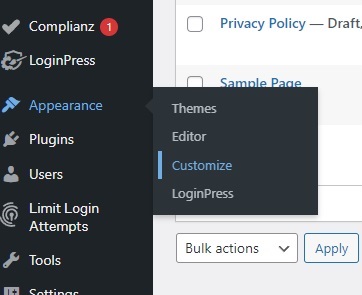
In The WordPress menu select appearance and then customize
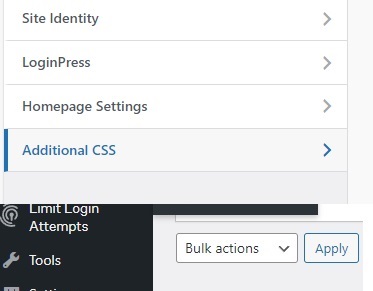
select CSS to add your button code.
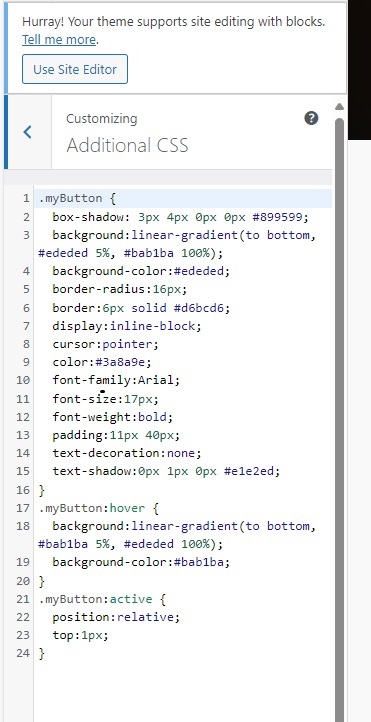
the button code inserted to CSS
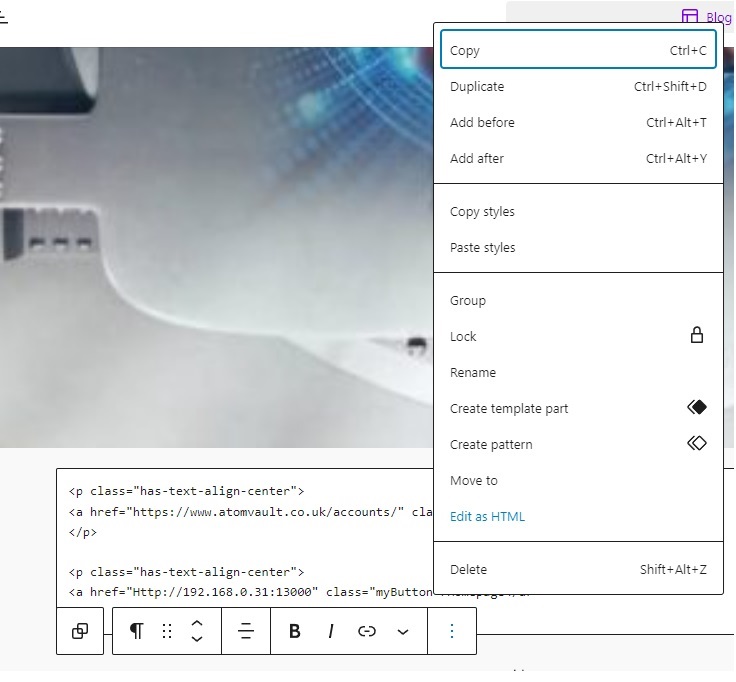
import your button text as shown in picture changing you link information.
second button set
.myButton2 {
box-shadow: 5px 4px 20px 7px #276873;
background:linear-gradient(to bottom, #599bb3 5%, #408c99 100%);
background-color:#599bb3;
border-radius:8px;
display:inline-block;
cursor:pointer;
color:#ffffff;
font-family:Arial;
font-size:20px;
font-weight:bold;
padding:13px 32px;
text-decoration:none;
text-shadow:0px 1px 0px #3d768a;
}
.myButton2:hover {
background:linear-gradient(to bottom, #408c99 5%, #599bb3 100%);
background-color:#408c99;
}
.myButton2:active {
position:relative;
top:1px;
}
Leave a Reply